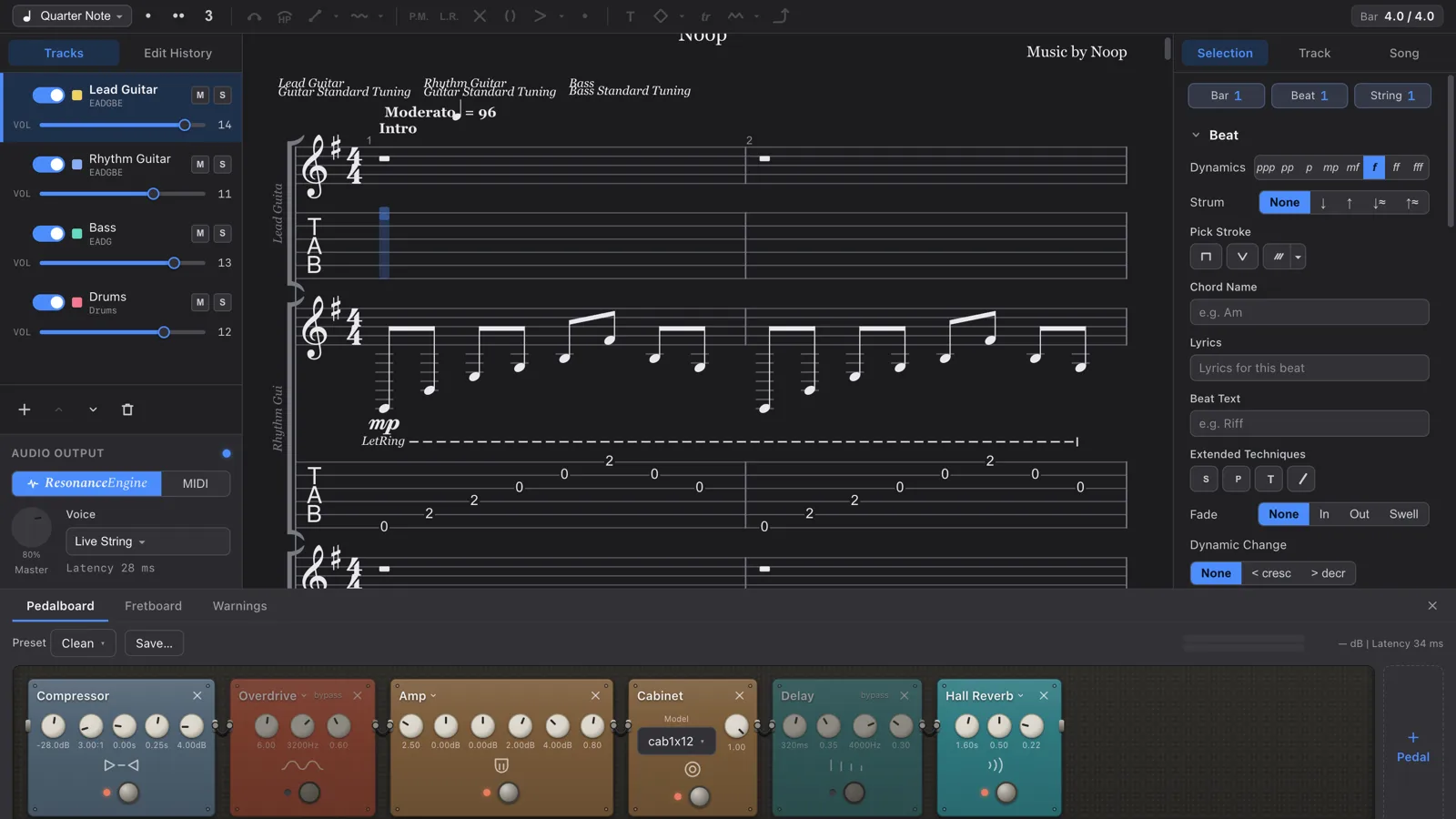
A tablature editor for macOS, built by Noop as our own product. It reads and writes .gp files and plays your score through a pedalboard you arrange yourself (the Resonance Engine). It also embeds an MCP server, so an AI client can read and edit the document you have open. Everything runs offline, with no account and no telemetry. The product site, tonograph.app, went live on 28 July 2026.
Tonograph is a tablature editor for macOS, built by Noop as our own product. It reads and writes .gp files and plays what you write through a signal chain you build yourself. Everything runs offline — no account, no telemetry.
Product site: tonograph.app
Why we built it
Tab editors already exist. But most notation apps hand playback to a fixed sound source, so the phrase you just wrote comes back as "notation audio" — something other than what you actually play.
Closing that gap is the one idea at the centre of Tonograph: play the phrase you wrote with your own tone. Writing and tone-shaping live in the same app, with nothing in between.
Four pillars
- A real editor — keyboard-first editing, Undo / Redo on every operation, multiple tracks and voices, tab and standard notation together
- Resonance Engine — your score runs through a chain you arrange yourself: 22 pedal models across 10 categories, plus a per-track mixer
.gp compatible — reads gp3, gp4, gp5, gpx and gp; writes .gp
- Print-quality PDF — vector output for A4 / Letter, with margins, scale, headers and page numbers

Play your score with your own tone
You build the playback path. This is not a fixed sound source with a reverb knob bolted on the end. Compressor, overdrive, distortion, fuzz, EQ, modulation, delay, reverb, amp, cabinet — reorder them, bypass them, and save the whole board as a preset, exactly like the real thing.
Every instrument is synthesised inside the app. Strings are modelled in real time, so a bend doesn't shift the pitch of a recording — the string itself bends. With no sample library, the download stays small and it makes sound the moment you install it. There is nothing to download.
Technique reaches timbre, not just volume. Palm mutes shorten the decay, dead notes choke the sound, harmonics strip the fundamental, slaps and taps change how the string is struck. To the engine, a score is not a list of pitches.
Write with AI, inside the app
Tonograph is an MCP (Model Context Protocol) server. Point an AI client such as Claude Desktop at it and the model reads and edits the document you have open — not an exported copy. Twenty-four tools cover reading, editing and Undo / Redo.
Its changes join the same history as your own, so ⌘Z undoes them. It can request any bar range rendered as an image, so the model doesn't settle for "that should be right" — it verifies what it actually wrote.

You stay in charge. Turn on approval mode and every operation that touches the document is shown as a diff and waits for your yes. The server listens on 127.0.0.1 only, demands a token on every request, and does not start until you enable it in settings. It is off by default.
How it is built
The hard parts of notation software are engraving, .gp compatibility and MIDI generation. We delegate those to a proven library (AlphaTab, MPL-2.0) and own the editing model ourselves — a deliberately hybrid architecture.
- The editing model is the single source of truth. We never mutate the library's objects in place
- The score is rebuilt from scratch for every render, playback and export, so what you see cannot drift from what is stored
- Every edit is a pure function returning a new model. Nothing is mutated, so Undo works honestly across every operation
- Anything the import cannot represent is returned as a warning, never silently dropped — the limits of compatibility stay visible
Export follows the same principle. Before writing .gp, it tells you specifically what that format cannot carry. Nothing disappears quietly.

The board under the score follows the track you are on — a fretboard for strings, a keyboard for pitched tracks, pads for percussion. It lights up with playback, and you can enter notes from it.
Software you can own
- Buy once — a single purchase on the Mac App Store. No subscription
- Fully offline — every feature works with no network
- No account — nothing to register, nothing to sign in to
- No telemetry — we collect nothing about you, your Mac, or your scores
The free / paid split has exactly one rule too: the free version does everything except write to disk. Open, edit, play and write alongside AI — all of it is in the free version.
Where it stands
On 28 July 2026 we published the product site, tonograph.app, ahead of the app itself. The app comes next: the free version straight from the site once signing and notarisation are done, and the paid version as a one-time purchase on the Mac App Store. The UI ships in five languages — English, Japanese, Spanish, Portuguese and Simplified Chinese — with light and dark appearance. It runs on macOS 12.0 (Monterey) or later, on both Apple Silicon and Intel.
Three original sample scores are bundled. Everything you hear in them is synthesised by the app itself — no sample libraries, no external plugins.
The score you wrote, coming back in your own tone. That round trip is what we set out to build.
Guitar Pro is a trademark of Arobas Music. Tonograph is not affiliated with, or endorsed by, Arobas Music.